들어가기 앞서...
날짜 데이터를 관리하는 DateTime 을 사용해보겠다!
본문으로...
- 우선은 날짜를 변경해줘야하는 부분을 확인하자!
하트 아이콘을 클릭해서 나오는 날짜 DatePicker 에서 클릭을 하게되면, 앱 화면에서 바뀌어야하는 부분이 바로, 사진속의 날짜 부분과 Deday 부분이다.
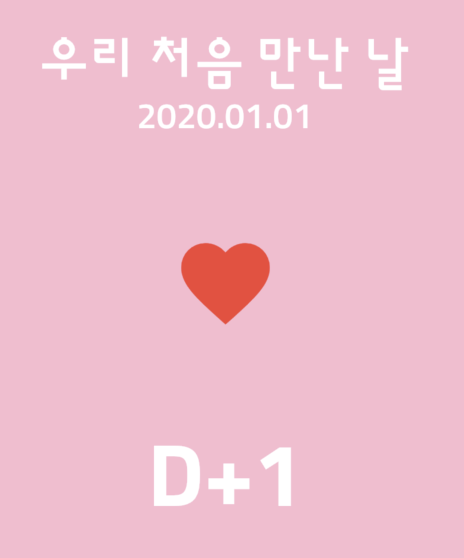
- 현재 SatelessWidget 으로 작성이 되어있는 _TopPart 클래스를 StatefulWidget 으로 변경을 해보자!
커맨드를 사용해서 convert to StatefulWidget 을 해준다.

그리고 State 클래스에 DateTime.now() 현재시간을 selectedDate 라는 이름의 변수로 저장을 해두고, DatePicker 로 선택을하면 초기화해서 값을 넣어주는 방법으로 진행을 할 것이다!
그렇다면 onDateTimeChanged 함수가 CupertinoDatePicker 의 변경을 할때마다 함수가 호출이 되니깐, 함수 안에 저번에 배웠던 setState((){}) 를 넣어주면 된다!
굉장히 간단하지 않은가~~
...
return Align(
  alignment: Alignment.bottomCenter,
  child: Container(
    color: Colors.white,
    height: 300.0,
    child: CupertinoDatePicker(
      mode: CupertinoDatePickerMode.date,
      onDateTimeChanged: (DateTime date) {
        setState(() {
          selectedDate = date;
        });
      },
    ),
  ),
);
...
그리고 날짜 부분과 D+1 부분의 코드를 setState(){} 함수로 선택된 날짜를 selectedDate 변수에 값을 저장시켜준것으로 값을 동적으로 할당을 해준다!
Text(
'${selectedDate.year}.${selectedDate.month}.${selectedDate.day}',
    style: TextStyle(
    color:Colors.white,
    fintFamily: 'sunflower',
	fontSize: 20.0),
);
...
Text(
	'D+${DateTime(
		DateTime.now().year,
		DateTime.now().month,
		DateTime.now().day,
	)}
')
여기서 추가적으로 DateTime 을 위에서 선언해주면, 조금더 깔끔해질것이다.
위에서 final now = DateTime.now(); 변수를 선언해줘서 now 를 가져다 쓰는것이 조금 더 깔끔하다!
이슈 해결

여기서 이 디데이를 설정하는 프로젝트 특성상 미래의 애인을 만날 날짜를 지정하면 D-Day 에 -숫자 표시가 된다.
이런 상황을 막아주기 위해서는 CupertinoDatePicker 에 최대 날짜인 (maximumDate) 를 설정해주자!
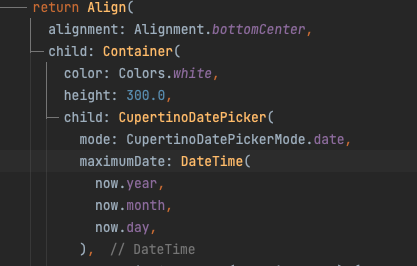
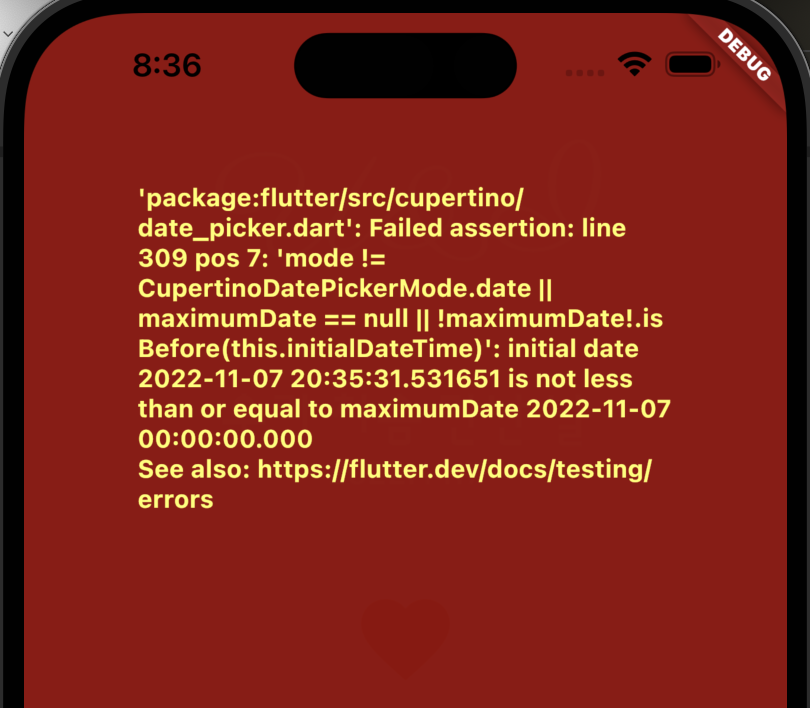
하지만 이렇게 했어도 이슈가 뜨는데, 맨처음으로 설정되어있는 날짜가 cupertino 가 실행되는 시간으로 현재시점이 되어버린다.
그래서 년월일분 최대 날짜를 정해놨는데, 내가 설정해놓은 시점 보다 그 이후 이기 떄문에 에러가 나는것이다.
해결 방법은 초기 데이터를 설정해주면 된다.
내가 선택해둔 seletedDate 로 설정해주면 된다.
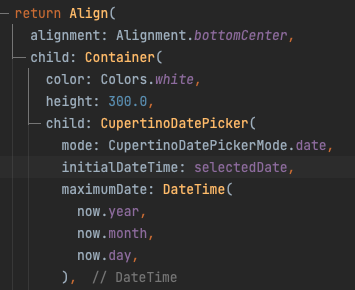
그렇다면 문제없이 진행되어진다.
최종 코드)
class HomeScreen extends StatefulWidget {
  const HomeScreen({Key? key}) : super(key: key);

  @override
  State<HomeScreen> createState() => _HomeScreenState();
}

class _HomeScreenState extends State<HomeScreen> {
  @override
  Widget build(BuildContext context) {
    return Scaffold(
        backgroundColor: Colors.pink[100],
        body: SafeArea(
          bottom: false,
          child: Container(
            width: MediaQuery.of(context).size.width,
            child: Column(
              children: [
                _TopPart(),
                _BottomPart(),
              ],
            ),
          ),
        ));
  }
}

class _TopPart extends StatefulWidget {
  const _TopPart({Key? key}) : super(key: key);

  @override
  State<_TopPart> createState() => _TopPartState();
}

class _TopPartState extends State<_TopPart> {
  DateTime selectedDate =
      DateTime(DateTime.now().year, DateTime.now().month, DateTime.now().day);

  @override
  Widget build(BuildContext context) {
    final now = DateTime.now();

    return Expanded(
      child: Column(
        mainAxisAlignment: MainAxisAlignment.spaceBetween,
        children: [
          Text(
            'U&I',
            style: TextStyle(
              color: Colors.white,
              fontFamily: 'parisienne',
              fontSize: 80.0,
            ),
          ),
          Column(
            children: [
              Text(
                '우리 처음 만난 날',
                style: TextStyle(
                    color: Colors.white,
                    fontFamily: 'sunflower',
                    fontSize: 30.0),
              ),
              Text(
                '${selectedDate.year}.${selectedDate.month}.${selectedDate.day}',
                style: TextStyle(
                    color: Colors.white,
                    fontFamily: 'sunflower',
                    fontSize: 20.0),
              ),
            ],
          ),
          IconButton(
              iconSize: 60.0,
              onPressed: () {
                showCupertinoDialog(
                    context: context,
                    barrierDismissible: true,
                    builder: (BuildContext context) {
                      return Align(
                        alignment: Alignment.bottomCenter,
                        child: Container(
                          color: Colors.white,
                          height: 300.0,
                          child: CupertinoDatePicker(
                            mode: CupertinoDatePickerMode.date,
                            initialDateTime: selectedDate,
                            maximumDate: DateTime(
                              now.year,
                              now.month,
                              now.day,
                            ),
                            onDateTimeChanged: (DateTime date) {
                              setState(() {
                                selectedDate = date;
                              });
                            },
                          ),
                        ),
                      );
                    });
              },
              icon: Icon(
                Icons.favorite,
                color: Colors.red,
              )),
          Text(
            'D+${DateTime(
                  now.year,
                  now.month,
                  now.day,
                ).difference(selectedDate).inDays + 1}',
            style: TextStyle(
                color: Colors.white,
                fontFamily: 'sunflower',
                fontWeight: FontWeight.w700,
                fontSize: 50.0),
          )
        ],
      ),
    );
  }
}

class _BottomPart extends StatelessWidget {
  const _BottomPart({Key? key}) : super(key: key);

  @override
  Widget build(BuildContext context) {
    return Expanded(child: Image.asset('asset/img/couple_free.png'));
  }
}
결과 )
끝으로...
- DateTime 의 상태관리를 할수 있다!
- cupertino의 파라미터를 알수 있었다! maximumDate, initalDateTime
- setState 를 통해 날짜가 변할때마다 변수에 저장할 수 있다!

'⭐️ 개발 > 플러터' 카테고리의 다른 글
| [패캠-코딩 왕초보를 위한 앱 만들기 풀패키지] (2) 복수 위젯담는 박스 (0) | 2022.11.09 |
|---|---|
| [패캠-코딩 왕초보를 위한 앱 만들기 풀패키지] (1) padding, margin, alignment (0) | 2022.11.09 |
| [프로젝트] 우리 처음 만난날 U&I (2) DatePicker 사용 (3) | 2022.11.07 |
| [이론] DateTime 및 Duration (0) | 2022.11.05 |
| [프로젝트] 전자액자 (3) PageController 사용 (0) | 2022.11.05 |